
Couples
The husband-and-wife or boyfriend-and-girlfriend version: put the one who turns in Photo 2, and Photo 1 can't shoot and holds on. The zombie love story most people make.
Your first zombie video is free
Upload a photo of each of you, or one photo of both. In a ruined grey city, Photo 1 raises a gun but can't shoot; Photo 2 has turned into a zombie and hugs them instead, then it cuts to a warm memory in a golden wheat field. Free during launch, ready in a few minutes.
1Add two photos — one person each
Two people: Photo 1 raises the gun and can't shoot, Photo 2 is the one who turned. With one photo of both, the person on the left holds the gun.
2Pick an effect
More effects
3Pick quality & length
This video: 10 credits · 10 songs a month for $29.90, or 40 a year for $100
By creating, you confirm you have permission to use these photos. Terms of Service
One free video per account · No app, no prompt, no card · No blood or gore
The AI zombie trend
Zombie Video is a free online zombie AI video generator for the AI zombie trend. Add one clear photo of yourself and one of a partner, friend or family member (or one photo of both of you), and it makes the whole trend story in one cinematic clip, with both faces still clearly the same people.
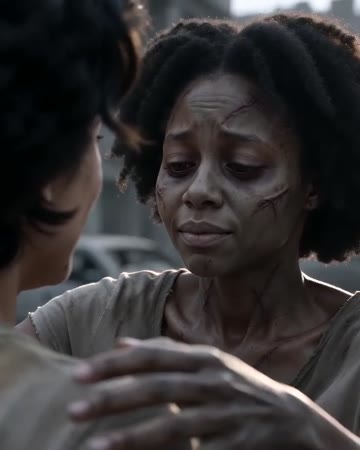
It is the story people post on TikTok, Instagram Reels and YouTube Shorts: in a grey, ruined city after a zombie apocalypse, the survivor (Photo 1) raises a gun with shaking hands at the one who turned (Photo 2). They can't pull the trigger and drop the gun, and the zombie hugs them instead of attacking. Then a hard cut to a warm memory: the two of them laughing and hugging in a golden wheat field at sunset.
Each clip is made by Seedance 2.0, an image-to-video model with native audio, with an emotional score (piano, strings, wind) and no speech. By default it is widescreen 16:9 like the trend clips, 12 seconds at 720p; you can choose 5 to 15 seconds, or vertical 9:16 or square 1:1 instead. The story is already written, so there is nothing to prompt.
How it works
Three steps, a few minutes, from your phone or computer. No app to install and no prompt to write.
Photo 1 is the survivor who holds the gun, Photo 2 is the one who turns into the zombie. Or use one photo of both: the person on the left holds the gun. Clear, front-facing, well-lit faces work best.
Zombie Story is already selected and set like the trend clips: widescreen 16:9, 12 seconds, 720p. Change the length (5 to 15 seconds), switch to vertical 9:16 or square 1:1, or pick 480p if you prefer.
Your zombie video is ready in a few minutes, with the gun, the hug and the memory in one clip. Download the MP4 and post it to TikTok, Reels or Shorts; add a caption or your own sound in CapCut or the TikTok editor if you like.
Ideas
The husband-and-wife or boyfriend-and-girlfriend version: put the one who turns in Photo 2, and Photo 1 can't shoot and holds on. The zombie love story most people make.
"Even as a zombie, you're still my best friend." A funny and sweet post for the group chat.
A parent and child, siblings or grandparents: the same scene told as a family story.
A zombie video of you and a friend or partner for Halloween posts, without makeup or costumes.
Pricing
A standard song (720p, 12 seconds) is 10 credits; a better model, higher resolution or longer video costs more. Pack credits never expire; plans refresh every month for less per song.
Basic
100 credits / month · ≈ 10 songs
$29.90/mo
≈ $2.99 / song
Pro
Save 44%300 credits / month · ≈ 30 songs
$49.90/mo
≈ $1.66 / song
Studio
Save 58%800 credits / month · ≈ 80 songs
$99.90/mo
≈ $1.25 / song
Basic: 10 songs a month for $29.90. The Crew Pack is 35 songs for $99, once.
Single
10 credits · ≈ 1 song
$9.99
≈ $9.99 / song
Duo Pack
Save 42%50 credits · ≈ 5 songs
$29
≈ $5.80 / song
Crew Pack
Save 72%350 credits · ≈ 35 songs
$99
≈ $2.83 / song
Studio Pack
Save 78%900 credits · ≈ 90 songs
$199
≈ $2.21 / song
Label Pack
Save 83%3000 credits · ≈ 300 songs
$499
≈ $1.66 / song
Secure checkout by Stripe · Packs are one-time and never expire · Plans renew until canceled — cancel anytime in Billing
Credits per 12-second video. You choose the model, resolution, length and format before each render: length scales the price, and every format costs the same.
| Model | 480p | 720p | 1080p |
|---|---|---|---|
| StandardSeedance 2.0 Mini | 5 credits | 10 credits | — |
| FastSeedance 2.0 Fast | 8 credits | 17 credits | — |
| ProSeedance 2.0 | 10 credits | 20 credits | 50 credits |
| UltraSeedance 2.5 | 17 credits | 37 credits | 93 credits |
Why Zombie Video
Other tools make you write a prompt, then join a zombie clip and a memory clip in an editor. Here the whole trend story is ready to go: two photos in, the gun, the hug and the memory out, in one clip.
Every new account gets one zombie video free at signup. No card, and nothing is for sale.
No prompts, no timeline, no settings to learn. If you can take a selfie, you can make a zombie video.
The video is built around the faces in your photos, so the zombie still looks like the person you love.
Runs in any browser on iPhone, Android or a computer, with no app to download. Vertical, square or widescreen MP4, ready for TikTok and Reels.
The zombie has ashen grey skin, dark veins and torn clothes, but no shot is ever fired and there's no blood, wounds or gore. The mood is emotional, not horror.
Photos are used only to render your video. Ask us to delete them any time, and only use photos of people who agreed.
FAQ
Yes: Zombie Video is free during launch, and every new account gets one zombie video free at signup, enough for the default 12-second trend clip at 720p. Add two photos and you get the whole AI zombie trend story, with no card, no app and no prompt.
It is a tool that turns photos into a short AI video in which a person becomes a zombie. Here you add a photo of each of two people (or one of both) and get the AI zombie trend story: in a ruined grey city one of them can't shoot the other, who has turned, they hug, and it cuts to a warm memory in a wheat field.
Upload one clear photo of each person (Photo 1 holds the gun, Photo 2 turns into the zombie) or one photo of both, keep Zombie Story selected and tap make. In about 5 to 8 minutes you can download a 12-second widescreen MP4.
You need a free account, but no card. The account is how you get your free video and keep it to download, and a failed render is refunded so it doesn't use up your free video.
Yes. Zombie Story is the trend as it is posted: the survivor raises a gun but can't shoot and drops it, the zombie hugs them instead of attacking, and a hard cut goes to a warm memory of the two of them in a golden wheat field, all in one 12-second widescreen clip with no editing.
Yes, one photo of both of you works: the person on the left holds the gun and the person on the right turns into the zombie. Or use one clear photo of each person. Use front-facing, well-lit faces that aren't covered by sunglasses, masks or hair.
Yes: the person in Photo 2 turns into the zombie, and the person in Photo 1 holds the gun. For the zombie love story with your boyfriend, girlfriend, husband or wife, put whoever should turn in Photo 2; it works the same for best friends, siblings or a parent and child.
Most videos are ready in about 5 to 8 minutes. By default the clip is 12 seconds in widescreen 16:9 at 720p, like the trend videos; before rendering you can pick 5 to 15 seconds, vertical 9:16 or square 1:1, and 480p or 720p. It has its own soundtrack and no speech.
Not inside the video: the memory scene is generated by the effect from the same two photos, the two of you laughing in a golden wheat field at sunset. If you want your own memory photo, clip or song, add it after the zombie clip in CapCut or the TikTok editor.
Seedance 2.0 (the Mini version by default), an image-to-video model that also generates the audio. The story prompt is already written, so you don't need to write one, and there's no specific trend song: the score is generated with the video.
Your photos are used only to render your video, and you can ask us to delete them at any time. Only upload photos of yourself and of people who agreed to be in the video, never strangers or public figures.
Yes. It runs in Safari, Chrome or any other browser on iPhone, Android or a computer, with nothing to install. Download the MP4 and post it to TikTok, Reels or Shorts.
No. The zombie has ashen grey skin, dark veins, a sunken look and torn clothes, and there is a gun, but no shot is ever fired and there's no blood, wounds or gore. The mood is sad and sweet, a love story rather than horror.
Not yet: the effect is written for two people, so it needs a photo of each of two people or one photo of both. Pets and solo videos aren't supported.
Two photos in, the whole zombie love story out: the gun, the hug and the memory, in a few minutes. Free during launch.